

Lyra isn’t enough: the search for Better UI architecture
If you’ve developed anything using Unreal Engine in the past few years, then you’ve hopefully heard of Lyra. Epic released the sample project with Unreal 5.0 to show off the engine’s shiny new features and frameworks. In particular, Lyra is often cited as a great demonstration of CommonUI and UI architecture.
However, there’s a world of difference between a system that works for a demo and one that works for an actual full-scale game, and I can attest to that from painful real-world experience. So today let’s talk about where Lyra’s UI architecture breaks down, what we can learn from those problems, and what you can do instead.
The Good
To be totally clear, Lyra does a lot of things right, or at least better. The UI layers and how they work with activation to control the flow of screens: awesome. Using extension points to configure the HUD from data: very cool, we’ll come back to that. Creating a component library and styling assets that can be used across the project: yes, always do this!
There are some minor issues that rub me the wrong way (I wish there was better/any documentation, text styles are clumsy to use in practice, etc) but in comparison to the default approach of manually creating widgets and juggling their state, it’s a huge step up. Even small teams stand a lot to gain from copying the patterns presented here.
The Unideal
The fundamental issue with Lyra at scale begins with this node:
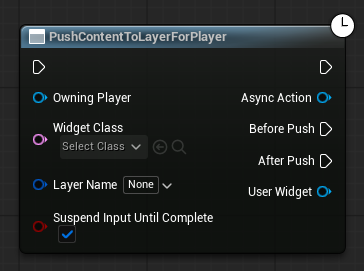
The asynchronous nature of this call is fine, great even! Avoiding hard references is always nice.
What’s not nice is that this node requires a reference to an actual widget class. Or to put it another way: it creates coupling between UI and gameplay.
If you’re a UI designer that’s just finished a revamp of the inventory screen, you can’t just trivially swap the old version. Instead, you need find where it’s referenced, check out gameplay assets that may well be locked, mess around with code you shouldn’t need to understand.
Then there’s the output, which gives the caller a pointer to the widget it just created. In a world of tight deadlines and limited manpower, this pointer is an incredible temptation to start directly calling functions on the widget, tightening the coupling even further.
On top of that, the caller specifies which layer the screen belongs to. When more than one place can open the same screen, you inevitably end up with issues where your layers aren’t working as expected.
The system is also tightly coupled in the other direction, with widgets binding to delegates on the player and other actors. This is better than directly binding (which I can’t believe is still an option)*, but still requires a deep connection to and understanding of gameplay’s systems. And if you need to add some information that isn’t already exposed by a delegate, then you often need to get the C++ folks involved.
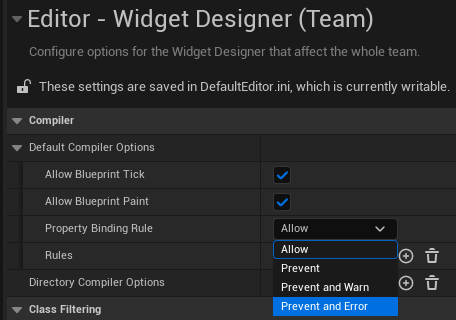
*By the way, did you know you can turn off traditional property binding from project settings? Hopefully some day this becomes the default.
A second, more situational gap is that of cross-layer conflicts. Within a single layer, widget conflicts are simple: push a new screen, and the old one deactivates, ready to return once the screen above it is popped.
However, imagine you want the HUD (which lives on the Game Layer) to animate out when you open the inventory (which lives on the Menu Layer). Without a centralized system, you’re forced to just call a “Hide HUD” function from the inventory, tethering two unrelated screens together.
The Cost
These might seem like minor quibbles, but I can speak from experience on just how much time gets wasted by these problems on a full-scale project.
Because UI and gameplay were tightly coupled, almost any UI change reached back into gameplay code. Swapping a screen required engineering. Adding a single new field to an existing screen required engineering. Work that was as simple as "move this, restyle that, show one more number" kept turning into cross-discipline tasks.
That coupling also meant constant checkout conflicts. UI and gameplay were editing overlapping files, so designers and engineers kept stepping on each other’s toes.
As for hiding the HUD, this was a persistent source of minor bugs. Sometimes designers forgot to hide the HUD for a given screen, sometimes they forgot to reshow it when the screen was torn down, and everything became worse when we also decided to hide the dialogue layer in some cases but not others.
Lessons Learned
There’s a whole lot to unpack here, but the central, most important principle is this:
Your designers should be as unblocked as possible.
They should need minimal knowledge of gameplay systems, they should be able to add, change, and swap widgets at will, and they should only hit checkout conflicts with other UI designers.
To accomplish this, we come upon the second key principle: your UI and your gameplay should be as decoupled as is reasonable. This is a common mantra across all types of software, and is the central driver of patterns such as MVC and MVVM.
We can lay some ground rules that will help us achieve this principle:
Gameplay should never hold a reference to a widget class.
UI should never hold a reference to a gameplay class.
Unrelated widgets should never hold a reference to each other.
And finally, it’s worth keeping in mind this rule of thumb: the path of least resistance should be the correct path.
Faced with pressure and deadlines, people are liable to start reaching for any workaround, even if it’s ugly and tanks performance. So our new system should be simple to use and quick to set up. (I’d also recommend using validators, but that’s a topic for another day.)
So how do we do this?
Adding Widgets Without Coupling
We want to add a widget, but we don’t want the caller to know what widget is being added. How?
Option 1: Reference by Tag
Instead of passing a widget, we pass a tag. Elsewhere, UI designers assign a widget to each tag, and can change that mapping whenever they want.
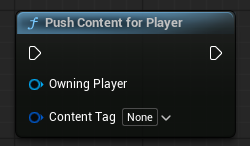
This is a big improvement! Without a return value, we have cut off gameplay’s access to specific widgets. However, there’s still some implicit coupling here: gameplay is aware that a specific piece of UI exists. Can we take this further?
Option 2: Respond to Gameplay State
Here, gameplay knows nothing about UI at all. Instead, it just announces its state (InCombat, OpenContainer, etc) and the UI decides what to show.
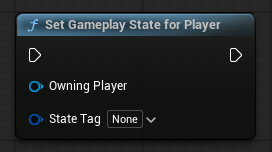
This solution is beautifully decoupled, but sadly breaks down when you consider that some UI truly has nothing to do with gameplay, such as confirmation modals. We’ve gone a little too far, and need to take a step back.
Option 3: Respond to UI State
This is effectively a compromise between options 1 and 2. Gameplay knows a little about UI, but has no understanding of the specifics.
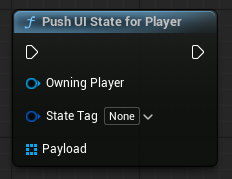
What’s this payload input? Read on to find out.
Alternatively, you can think of it as being just like option 1, except you can have multiple UI elements that correspond to a given tag.
So now we have some data that maps a tag to a widget. Great! Let’s enhance this further.
Respect tag hierarchy. A widget mapped to tag X also appears for tag X.Y. This makes it simple to define widgets that appear in broad cases and widgets that are more situational.
Use this same data to define what layer a widget should be pushed to. This makes sure the behavior is consistent no matter who pushes the state.
Use this same system for extension points! The approach is fundamentally the same, but the data points to a given slot rather than a layer. This way, we control everything with one system, rather than having two separate approaches.
Add removal tags. This allows you to remove a given UI for a given UI state, which solves our HUD hiding problem. Note that this does introduce some complexity! You now need to account for potential conflicts, where one piece of data says to add a screen while another piece of data says to remove it.
Invest in tooling. At minimum, you’ll want to log who pushes what UI state, and what widgets are added/removed as a result. I’d also highly recommend a way to view and edit all your different data in a single window, even if the data itself is spread across different assets.
Routing Data with Viewmodels
So now we have our widgets appearing at the correct time and in the correct place, all without gameplay being given a single pointer.
But without those pointers, how do we actually pass information between UI and gameplay? The solution is Unreal’s UMG Viewmodel plugin.
If you’re this far into this post but don’t know what this plugin is, I’m a little confused but I highly encourage you to check it out. The view binding system alone is a revelation that makes working with UMG so much faster and tidier.
To quickly summarize, the plugin lets you easily set up an MVVM architecture, where viewmodels act as an intermediary through which your UI and gameplay systems communicate. In our case, we use viewmodels in two distinct ways:
Global Viewmodels: These are effectively singletons that contain some type of global information, such as the current game time. Gameplay objects can access and update them, and widgets can connect to them automatically through a resolver.
Instance Viewmodels: These viewmodels correspond to a particular instance of an object, such as a chest. They are owned by the instance and passed indirectly to the UI via the “payload” in our function above.
One extra benefit of viewmodels is that designers don’t need to wait on engineers to get started. They can easily set up temporary blueprint viewmodels with debug data, which can be swapped out later with minimal fuss.
The Result
Lyra is a solid starting point that teaches a lot of key concepts. However, in practice it is incredibly clunky to use at scale.
Now though, we’ve expanded Lyra’s systems to fix those issues. Designers can swap and update widgets freely without involving other parties. They can easily connect to gameplay data in a way that is flexible and performant. They can test their setups immediately in-engine. In short, designers can do their jobs while engineers do theirs, and everyone is happier for it.
Of course, every game has its own unique needs, so it’s possible that what I’ve described here isn’t the correct solution for you. Still, for those that are struggling with their UI architecture, I hope this gives you something to think about.
Cheers!
